Editorial Disclosure & Technical Scope
This is a specification-based buying guide. Robotics Engineering Lab has not purchased, built, or lab-tested the arms below; every specification, price, and capability statement comes from the manufacturers' and authorized resellers' published documentation cited in the sources section, with access dates. Prices are indicative 2026 figures for budgeting and change frequently; confirm current pricing and configuration with the seller before purchase.
Start With Constraints, Not With Spec Sheets
Searching for the "best robot arm for education" usually produces spec tables, and spec tables miss the point. The right arm for a high school in Ohio, a university lab in Toronto, and a hobbyist in a basement are different machines, even at the same price. Before comparing payloads, write down five constraints in this order: budget, degrees of freedom and payload the curriculum needs, software ecosystem, classroom safety, and support and service life. Each constraint eliminates models, and only the survivors get compared on specifications. This is the same method this site uses for controller selection and end-effector selection: decide the constraints first, then compare.
Constraint 1 — Budget Tiers
Educational arms in 2026 cluster into four budget tiers. The tier defines the realistic candidate set before any spec sheet is opened.
| Tier | Indicative 2026 price (USD) | What it buys | Representative platforms |
|---|---|---|---|
| DIY light | Under $1,000 | Small 4–6-DOF kits, or the beginning of a self-sourced arm; limited payload and documentation | Open-source STL arms (RR1 class), budget kits, many marketplace arms |
| Kit class | $1,300 – $2,100 | Full 6-axis kit you assemble, wire, and program; real learning value in the build itself | AR4 MK3 combo kit + motor package |
| Turnkey 4-axis | $995 – $2,000 | Classroom-ready arm with curriculum, tool heads, and support | Dobot Magician, Dobot Magician Lite |
| Turnkey 6-axis | $4,000 – $9,000 | 6-DOF arm with ROS support, industrial-style control box, higher payload | Niryo Ned2, Dobot Magician E6, UFACTORY xArm 5/6 |
Add 20–40% to the arm price for end effectors, spare jaws, safety guarding, software licences, shipping, and (for Canadian buyers) customs and currency conversion. A school that buys a $2,000 arm usually spends $2,600 by the time the lab opens. For hobbyists, add the tools and a bench power supply; see the robot arm power supply sizing guide for that part of the budget.
Constraint 2 — Degrees of Freedom and Payload
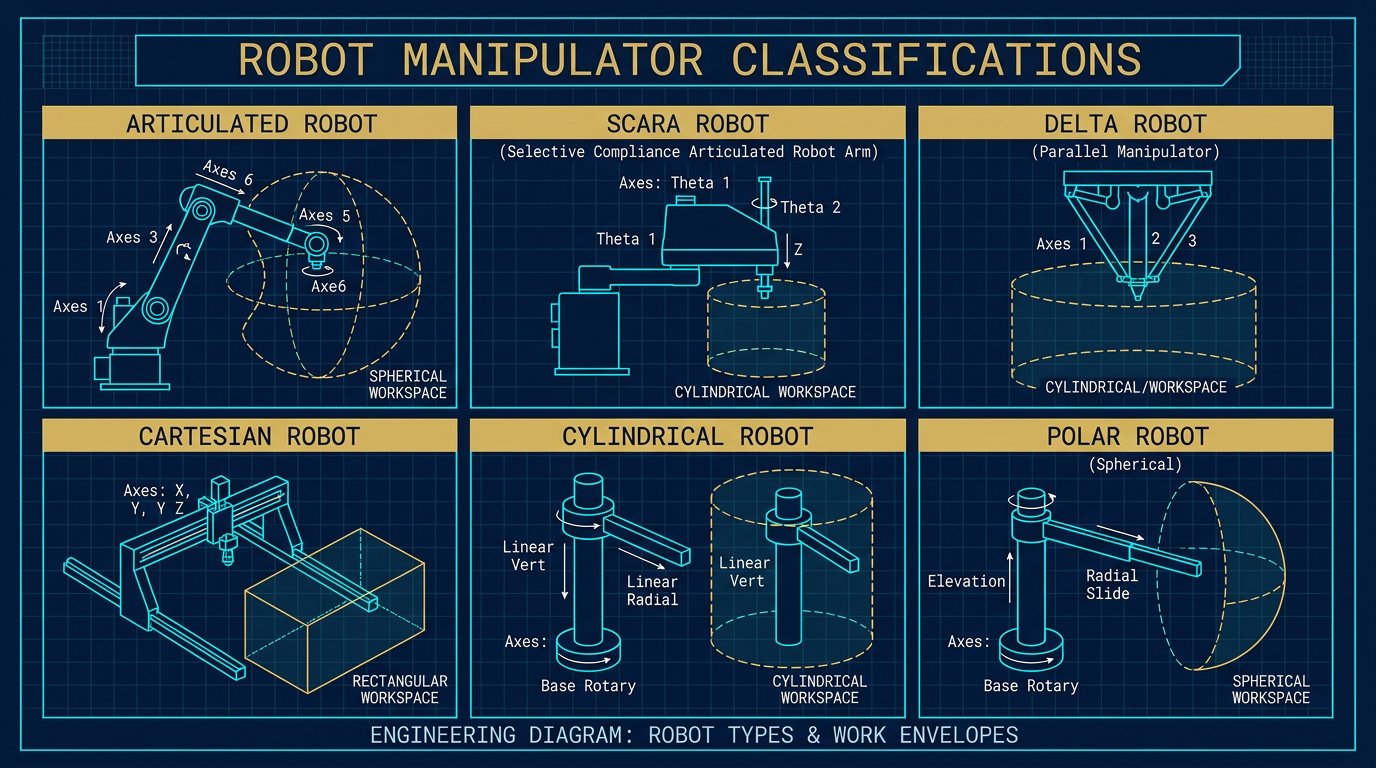
Degrees of freedom decide what the curriculum can teach. A 4-axis arm teaches coordinate systems, pick-and-place, and end-effector basics, but it cannot demonstrate wrist reorientation, so it is a dead end for inverse-kinematics and manipulation coursework. A 6-axis arm with a three-axis wrist covers the full industrial syllabus, including the wrist-decoupled IK taught in most university courses and the trajectory and singularity content that appears in this site's inverse kinematics guide.
Payload matters less in education than in industry, but it sets what the arm can carry: cameras, grippers, and small workpieces. Practical guidance:
- 300–500 g payload: fine for pens, cups, small blocks, cameras, and light grippers; typical of Niryo Ned2 and Dobot Magician.
- 750 g – 1 kg: covers most classroom tooling with margin; Dobot Magician E6 class.
- 1.5–2 kg: allows a camera plus gripper plus a real workpiece; AR4 (1.9 kg) and PiPER (1.5 kg) class.
- 3–5 kg: xArm class; also useful for light lab automation and prototyping beyond coursework.
Remember that payload is quoted at a reference TCP position; offset tooling derates it, and the quoted payload only applies at the rated reach and wrist moment.
Constraint 3 — Software and Curriculum Ecosystem
The software stack is often the deciding constraint because it determines what students can do on day one and where the course can go by week twelve. The main ecosystems in 2026:
- Block/graphical programming: DobotStudio and similar tools get beginners moving parts within minutes. Essential for middle-school and introductory high-school labs.
- Python: The universal second step. AR4 ships with Python control software; Niryo provides PyNiryo; UFACTORY and Dobot publish Python SDKs.
- ROS 1 / ROS 2: The university and research standard. The ROS 2 control guide covers what ros2_control integration requires; if the course will reach that level, the arm's ROS packages and their distribution support must be verified for the exact ROS 2 release your lab uses. Niryo Ned2 documents ROS 1 (Melodic); UFACTORY publishes ROS 1 and ROS 2 packages; AR4 has community ROS interfaces; Dobot publishes ROS packages for several models.
- Curriculum and certification: Dobot and RobotLAB bundles include lesson plans and classroom licences; Niryo sells educational packs; AR4 relies on its manual plus open-source community material. If teacher time is the scarce resource, packaged curriculum is worth real money.
Constraint 4 — Classroom Safety
Desktop arms are small, but they are machinery: they exert pinch forces at the wrist, can drop tooling, and move without warning during program faults. The safe classroom setup includes: software speed limits; an emergency-stop or enable control within reach of the operator; fixed mounting (a bolted base plate beats a C-clamp for wrists and fingers); supervised operation for students under the age of majority; and a written task-based risk assessment reviewed by the school's safety officer, following the approach of ANSI/RIA R15.06 and applicable provincial or state guidance. The arms compared here are not collaborative in the ISO 10218 sense out of the box — treat them as small industrial robots with guarding and supervision, not as toys. Schools in Canada should also check their province's educational-safety guidance for machine equipment in classrooms.
Safety Warning
Never allow unsupervised operation of a robot arm by students, keep hands and loose clothing clear of the wrist and base joints, and lock out or disconnect power when the arm is serviced or moved. A desktop arm's gripper can pinch fingers hard enough to injure, and a dropped tool can cause eye injuries. This guidance is educational and does not constitute a safety approval or a formal risk assessment for any specific classroom.
Constraint 5 — Support, Spares, and Service Life
Educational arms take abuse: dropped grippers, crashed wrists, students who torque joints past their stops. The fifth constraint is the boring one that determines whether the arm is still running in year three: manufacturer or authorized-reseller support, published spares (motors, gearboxes, boards, jaws), and a manual that students can follow. The arms from established vendors (Annin Robotics, Dobot, Niryo, UFACTORY) all publish manuals and sell spares. Marketplace arms may undercut on price but frequently have no manual, no spares, and no support contact — which makes them a poor fit for a school that cannot repair them in-house. A 2025 survey of low-cost educational arms in the academic literature makes the same point: the cheapest arms often need high-power controllers and community assembly effort that push the real cost well past the list price.
Best Robot Arm for Education: The Arms Most Often Compared in 2026
These four platforms are the ones that dominate education and hobby discussions in North America, so the comparison below uses their published specifications. All figures come from the cited manufacturer/reseller pages; none of these arms was bench-tested by this site.
| Model | DOF | Payload | Reach | Repeatability | Software | Indicative 2026 price (USD) |
|---|---|---|---|---|---|---|
| Annin Robotics AR4 MK3 | 6 | 1.9 kg (4.15 lb) | 629 mm (24.75 in) | ±0.5 mm (per Annin) | Python (Teensy 4.1), ROS via community | $1,329 kit + $729.81 motor package ≈ $2,059 |
| Dobot Magician (V3) | 4 | 500 g | 320 mm | ±0.2 mm | DobotStudio, Blockly, Python, ROS packages | $995 – $1,999 depending on bundle |
| Dobot Magician E6 | 6 | 750 g | 450 mm | ±0.1 mm | DobotStudio Pro, Python, C++, ROS, MATLAB | $6,995 (authorized reseller) |
| Niryo Ned2 | 6 | 300 g | 440 mm | ±0.5 mm | Niryo Studio, PyNiryo (Python), ROS 1 | About $4,000 – $5,700 by region/reseller |
| UFACTORY xArm 5 / 6 / 7 | 5 / 6 / 7 | 3 / 5 / 3.5 kg | 700 mm | ±0.1 mm | uArm Studio, Python, ROS 1 & 2, Modbus | About $5,300 – $11,000 by model and reseller |
Two other platforms deserve a mention. The AgileX PiPER (1.5 kg payload, BLDC-driven, about $3,000 per community reports in early 2025) sits between the kit class and the turnkey 6-axis class and is popular in university labs, though pricing should be confirmed with the vendor. And the RR1 and similar open-source stepper arms target the sub-$1,000 band but typically require the builder to source motors, drivers, and controllers, which pushes the real cost toward or past $1,000 — the same conclusion reached in the 2025 academic survey cited in the sources.
Decision Matrix: Match the Arm to the Lab
| Program profile | Recommended arm class | Why |
|---|---|---|
| Middle school, first contact, block programming | Dobot Magician Lite or Magician | Curriculum, tool heads, low maintenance, 4-axis is enough |
| High school CTE with build experience | AR4 MK3 kit | Students assemble, wire, and program a real 6-axis arm; best learning-per-dollar |
| High school needing turnkey 6-axis | Niryo Ned2 or Dobot Magician E6 | 6-DOF out of the box, documented safety, packaged education ecosystem |
| College / university robotics lab | UFACTORY xArm or PiPER | ROS 2, higher payload for cameras and tooling, industrial-style control |
| Hobbyist, mechanical build interest | AR4 MK3 kit | Full control over hardware; spares and community support |
| Research prototyping / light automation | xArm 6/7, PiPER | Payload, repeatability, and API depth for real manipulation research |
Example calculation: a two-station high school lab on a $8,000 budget
Assumptions: 24 students, two stations, a semester course ending with a pick-and-place project, USD 8,000 total hardware budget.
- Option A (build experience): two AR4 MK3 kits at about $2,060 each with motors = $4,120; two benches, tooling, and spares ≈ $1,500; total ≈ $5,600, leaving room for one turnkey 4-axis Dobot Magician ($1,995) as a fast-start station.
- Option B (turnkey): one Dobot Magician E6 at $6,995 leaves only ~$1,000 for tooling — a single-station lab with no build experience.
Result: Option A gives 24 students hands-on build time plus one turnkey station for intro labs, at a similar total to one premium 6-axis arm. The example is illustrative — it sizes a plausible lab, not a purchase this site made.
Indicative 2026 Prices and Where They Come From
The prices in the comparison table are indicative 2026 reference prices compiled on 2026-08-31 from the manufacturers' and authorized resellers' published listings: Annin Robotics (AR4 MK3 combo kit $1,329 and motor package $729.81), Dobot US (Magician Educational $1,995) and RobotLAB (Magician V3 from $1,699; Magician E6 $6,995; Magician Lite $995), Niryo (Ned2 about $3,990–4,829 EUR, roughly USD 4,300–5,200; US resellers list up to about $5,700), and UFACTORY US / authorized resellers (xArm from about $5,299–8,899 depending on model and bundle). Prices exclude tax, shipping, tooling, and any curriculum licences; they are not Robotics Engineering Lab inventory, and no discount, warranty, or store terms are implied. Canadian buyers should convert at the current exchange rate and add customs and provincial sales tax.
Typical Reader Question: AR4 vs Dobot for a High School
Typical Reader Question
"Our high school can fund one arm at about $2,000. Which is better for us, the AR4 kit or a Dobot Magician?"
Engineering analysis: These are different products at a similar price. The AR4 gives a full 6-axis arm that the students assemble and wire; the learning is in the build, the kinematics, and the Python control, and the payload (1.9 kg) and reach (629 mm) beat the Dobot Magician. The cost is the assembly time (many hours), the need for 3D-printed covers and a bench supply, and the absence of packaged curriculum. The Dobot Magician works out of the box in minutes, includes gripper/suction/pen tool heads in most bundles, and has lesson plans, but it is 4-axis with a 500 g payload, so advanced IK and manipulation coursework stops at the wrist. For a CTE program with teacher time to mentor a build, the AR4 is the stronger educational investment; for a program that needs a dependable, fast-start classroom station with curriculum, the Dobot is. If the school can fund two arms, one of each is the common and defensible answer.
Sources and Methodology
- Annin Robotics (anninrobotics.com): AR4 MK3 combo kit $1,329, motor/driver/power package $729.81, AR4 specifications (6-DOF, 4.15 lb/1.9 kg payload, 24.75 in/629 mm reach, ±0.5 mm repeatability, Teensy 4.1 controller). Accessed 2026-08-31.
- Dobot US (dobot.us): Magician Educational Model $1,995 with 4-axis, 500 g payload, 320 mm reach, ±0.2 mm repeatability. RobotLAB (robotlab.com): Magician V3 from $1,699, Magician Lite $995, Magician E6 $6,995 with 6-axis, 750 g, 450 mm, ±0.1 mm. Accessed 2026-08-31.
- Niryo (niryo.com) and authorized resellers (egorobotics.com, us.rs-online.com): Ned2 6-axis, 300 g payload, 440 mm reach, ±0.5 mm repeatability, ROS 1 on Ubuntu; pricing from about USD 3,999 to 5,714 depending on region and bundle. Accessed 2026-08-31.
- UFACTORY (ufactory.us) and authorized resellers (rapidscan3d.com): xArm 5/6/7 specifications (3/5/3.5 kg payload, 700 mm reach, ±0.1 mm repeatability, ROS 1 and ROS 2 packages) and pricing from about $5,299 to $11,000. Accessed 2026-08-31.
- Community price data: r/robotics thread "Entry-level Robot Arm" (January 2025) for AgileX PiPER pricing and class positioning. Accessed 2026-08-31.
- Academic survey: "Strong, Accurate, and Low-Cost Robot Manipulator" (arXiv:2507.15693, 2025), which surveys educational arms and the real cost of low-price kits. Accessed 2026-08-31.
- Safety framework: ANSI/RIA R15.06 risk-assessment approach and manufacturer manuals for classroom supervision guidance. Accessed 2026-08-31.
- Methodology: This is a specification-based buying guide compiled from the documents above; no arm listed here was purchased or bench-tested by Robotics Engineering Lab. Prices are indicative 2026 and require confirmation at purchase.
Frequently Asked Questions
What is the best robot arm for a high school robotics class?
It depends on the budget and the curriculum. For a hands-on build-and-program course under about USD 2,500 total, the AR4 MK3 kit (about USD 2,060 with the motor package) gives a real 6-axis arm that students assemble, wire, and program in Python. For a turnkey station that works out of the box with guided curriculum, the Dobot Magician line (USD 995 to 1,999 for 4-axis models) or the Niryo Ned2 (about USD 4,000 to 5,700) are the common choices. Match the arm to the teaching goal: assembly and troubleshooting experience favors a kit, classroom throughput favors a turnkey arm.
Is a 4-axis robot arm enough for teaching robotics?
Yes for introductory and automation courses: a 4-axis arm such as the Dobot Magician teaches coordinate systems, pick-and-place, end-effector selection, and basic programming well. It is not enough for advanced coursework in inverse kinematics, trajectory planning, or ROS manipulation, because those topics need a wrist with at least three intersecting axes, which requires 6 degrees of freedom. If the program includes a university articulation pathway, buy at least one 6-axis arm for the advanced lab even if the introductory lab uses 4-axis arms.
Which educational robot arm supports ROS?
The Niryo Ned2 ships with ROS 1 (Melodic) on Ubuntu and PyNiryoRos; the UFACTORY xArm line publishes ROS 1 and ROS 2 packages for its arms; the AR4 supports Python control and has community ROS interfaces; and Dobot publishes ROS packages for several models. ROS support depth varies by distribution, so verify the exact ROS 2 version before buying if your course uses ROS 2 Jazzy or later. ROS 2 support matters most if the course continues into MoveIt 2, ros2_control, or simulation-based manipulation.
How much should a school budget for an educational robot arm?
As an indicative 2026 planning range: under USD 1,000 buys a light desktop arm or the start of a kit; USD 1,300 to 2,100 buys an AR4-class 6-axis kit including motors; USD 1,700 to 2,000 buys a turnkey 4-axis Dobot Magician; USD 4,000 to 6,000 buys a 6-axis turnkey arm such as the Niryo Ned2; and USD 5,300 to 9,000 buys a UFACTORY xArm 6 or 7. Add 20 to 40 percent for end effectors, safety guards, spare parts, software licences, and shipping to Canada.
Are cheap robot arms from marketplaces safe and appropriate for classrooms?
Use them with caution. Low-cost arms from marketplaces can be good value, but schools need documentation that a manufacturer will not always provide: an instruction manual, electrical ratings, a declared emergency-stop function, and a responsible contact for support. Several brands in the 6-axis desktop class ship with little safety documentation and no support network, which matters for liability and maintenance planning in a school environment. Buy from a manufacturer or authorized reseller that publishes specs and a warranty, and have a qualified person review the arm before unsupervised student use.
What safety considerations apply to robot arms in classrooms?
Treat a desktop arm as machinery, not a toy: supervise the lab, keep fingers and loose clothing away from pinch points and the wrist, set speed limits in software, and ensure the emergency-stop or enable control is within reach of the student operating it. Schools in the USA and Canada can follow the risk-assessment approach of ANSI/RIA R15.06 and the relevant provincial or state guidance for educational machinery, and the arm's manufacturer manual. A risk assessment for the specific classroom tasks, reviewed by the school's safety officer, is the right baseline before any unsupervised operation.